
FirexportGuides
How to set custom claims in Firebase Authentication
Custom claims are values you attach to a Firebase user, such as admin: true, that travel in the user’s ID token. They are how most apps give a user a role that Security Rules and a backend can check. The Firebase console can’t set them, and doesn’t even show them: Authentication > Users has no field for claims. They are set with the Admin SDK, and there are three ways to do that, depending on who gives the role and how often.
Updated October 27, 2026. Firexport, the extension in method 1, is ours. Methods 2 and 3 don’t need it.
The short answer
| 1. Console + extension | 2. Admin SDK script | 3. Cloud Function | |
|---|---|---|---|
| Setup | Install a Chrome extension, connect your Google account | Node.js and Google Cloud credentials | A deployed function and code in your app |
| Who sets the claims | You, in the console | You, in a terminal | Admins of your app |
| Existing claims | Shown, and kept unless you delete them | Kept, the new ones merged in | Kept, the new ones merged in |
| Billing enabled | Not needed | Not needed | Required (Blaze plan) |
1. Set claims in the Firebase console with Firexport
Firexport is a free Chrome extension that adds Edit user to the ⋮ menu of each user in Authentication > Users. Its window shows the user’s custom claims as rows you can add to, change and delete, next to their email, password, profile and sign-in providers. It saves with a Google account you connect, so there is no service account key or code to set up.
- Install Firexport from the Chrome Web Store.
- In the Firebase console, open Authentication > Users.
- Hover the user’s row, click the ⋮ at its right end, then Edit user.
- The first time, the window asks you to Connect Google account: pick the account signed in to the console and allow it to manage Firebase Authentication users in Google’s window.
- Under Custom claims, click Add claim, type its name, such as
admin, and pick a type: string, number, boolean, object, array or null. Objects and arrays hold more rows inside. - Click Save. Only what you changed is saved, and the user’s other claims stay as they were.
What the window checks
- Size. Firebase takes at most 1,000 bytes of claims per user. The window counts the bytes as you type and won’t save past the limit.
- Reserved names. A top-level claim can’t use a name Firebase keeps for its own token fields, such as
sub,aud,exporfirebase. The window marks one before you save. - Changes by someone else. If the user changed after you opened the window, nothing is saved, and you can read the latest values and try again.
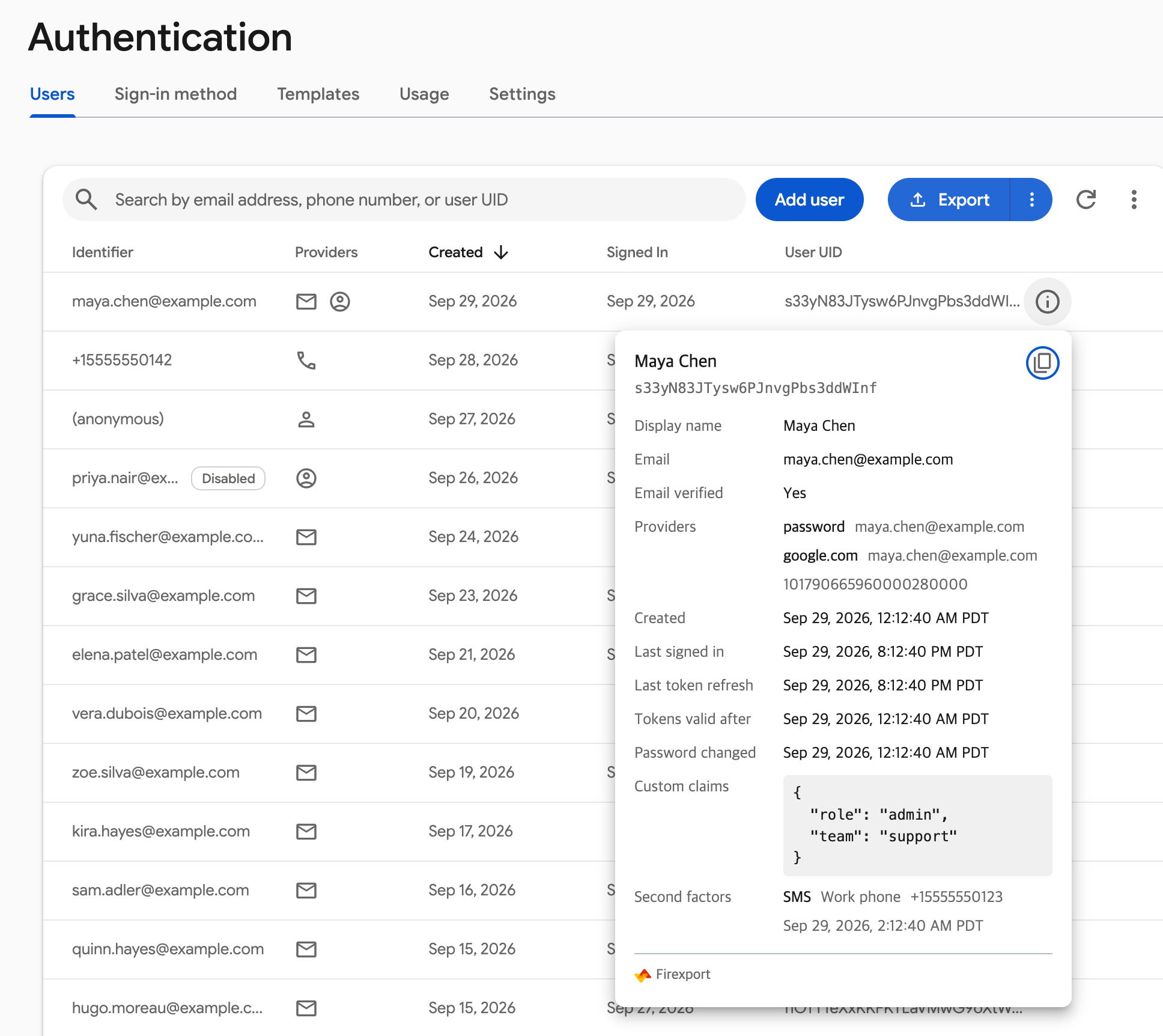
To see a user’s claims without changing anything, click the info icon at the start of the row’s actions: its card lists the user’s whole record, custom claims included. To give a role to a user who doesn’t exist yet, the Add user button’s ⋮ menu has Advanced, which takes claims with the rest. The saves use the connected account’s permissions, which need to include managing Firebase Authentication users. Your users’ data goes from your browser straight to Google, and never to us. Edit user is free on every plan.
Set and check Firebase custom claims in the console, without a script or a service account key.
 Add to Chrome — free
2. Set claims with an Admin SDK script
To give the same claim to many users, or to keep it in a script you can run again, use the Firebase Admin SDK from Node.js. The script below takes the claims as JSON and any number of UIDs or emails, and merges the claims into what each user already has. It needs an account that can manage users: a project Owner or Editor, or the Firebase Authentication Admin role.
- Install the SDK:
npm install firebase-admin - Sign in for local credentials:
gcloud auth application-default login. On a server, pointGOOGLE_APPLICATION_CREDENTIALSat a service account key instead. - Save the script below as
set-claims.mjs, replaceyour-project-id, and runnode set-claims.mjs '{"admin":true}' maya@example.com.
// Usage: node set-claims.mjs '{"admin":true}' maya@example.com u2   → adds admin: true to each user's claims
// Users are UIDs or emails. The claims you pass are merged into the ones each user has; null removes one.
import { initializeApp } from 'firebase-admin/app';
import { getAuth } from 'firebase-admin/auth';

initializeApp({ projectId: 'your-project-id' });
const auth = getAuth();
const [json, ...users] = process.argv.slice(2);
if (!json || !users.length) throw new Error(`Usage: node set-claims.mjs '{"admin":true}' <uid or email> ...`);
const changes = JSON.parse(json);
if (typeof changes !== 'object' || changes === null || Array.isArray(changes)) throw new Error('Pass the claims as a JSON object');

for (const who of users) {
  const user = who.includes('@') ? await auth.getUserByEmail(who) : await auth.getUser(who);
  // setCustomUserClaims() replaces every claim the user has, so start from the current ones.
  const claims = { ...user.customClaims, ...changes };
  for (const [name, value] of Object.entries(claims)) if (value === null) delete claims[name];
  await auth.setCustomUserClaims(user.uid, claims);
  console.log(`${who}: ${JSON.stringify(claims)}`);
}setCustomUserClaims()replaces all of a user’s claims with what you pass. That is why the script reads the current claims first: calling it with only{"admin":true}would delete the others.- A
nullvalue removes that claim, so{"admin":null}takes the role away. - Claims over 1,000 bytes, or with a reserved name, make the Admin SDK throw, and that user keeps the claims they had.
3. Let your app’s admins set claims with a Cloud Function
When roles are part of your app, for example an admin screen where moderators are appointed, the Admin SDK has to run on a server you control. A callable Cloud Function is the usual place. The one below lets a user whose token already says admin: true set claims on another user. Deploying functions needs the Blaze plan.
// functions/index.js: a callable function your app's admin screen calls as setClaims({ uid, claims })
const { onCall, HttpsError } = require('firebase-functions/v2/https');
const { initializeApp } = require('firebase-admin/app');
const { getAuth } = require('firebase-admin/auth');

initializeApp();

exports.setClaims = onCall(async (request) => {
  // Only a user whose token already says admin: true may change claims. Give the first admin theirs another way.
  if (request.auth?.token.admin !== true) throw new HttpsError('permission-denied', 'Only admins can set claims');
  const { uid, claims } = request.data;
  const user = await getAuth().getUser(uid);
  const next = { ...user.customClaims, ...claims }; // setCustomUserClaims() replaces them all, so keep the others
  await getAuth().setCustomUserClaims(uid, next);
  return { uid, claims: next };
});
Deploy it with firebase deploy --only functions, then call it from the app:
import { getFunctions, httpsCallable } from 'firebase/functions';

await httpsCallable(getFunctions(), 'setClaims')({ uid: 'u1', claims: { editor: true } });
Someone has to be the first admin. Give that one account its admin claim with method 1 or 2.
When the new claims take effect, and how to use them
Claims live in the ID token, which Firebase refreshes about once an hour. A user sees new claims at the next refresh or the next sign-in. To get them right away, the app can call getIdToken(true) on the signed-in user, then read them with getIdTokenResult(). Security Rules read them from request.auth.token:
match /posts/{postId} {
  allow read: if true;
  allow write: if request.auth != null && request.auth.token.admin == true;
}- Claims are for access, not for profile data. They go with every request, and Firebase caps them at 1,000 bytes.
- The user can read their own claims by decoding their token, so don’t put secrets in them.
- To get every user’s claims in one file, export the users. The Auth users export guide shows three ways.
FAQ
Can you set custom claims in the Firebase console?
Not with the console alone. Authentication > Users has no field for custom claims and doesn’t show them. They are set with the Admin SDK, from a script, a server or a Cloud Function, or with a browser extension such as Firexport, which adds Edit user to the Users tab.
How do I see a user’s custom claims?
The console doesn’t show them. With the Admin SDK, getUser(uid) returns them as customClaims. In the app, getIdTokenResult() returns them as claims for the signed-in user. Firexport shows them on the info card of each row in Authentication > Users.
Why doesn’t my app see the new custom claims?
Claims are read from the ID token, and the user’s current token was issued before you set them. Firebase refreshes it within an hour, and a new sign-in gets a new one. To pick them up at once, call getIdToken(true) on the signed-in user.
Does setCustomUserClaims replace the existing claims?
Yes. It sets the user’s claims to exactly the object you pass, so any claim not in it is removed. Read the current claims with getUser() and merge your change into them, as the script above does. Passing null removes all of them.
How large can Firebase custom claims be?
At most 1,000 bytes for all of a user’s claims together, as JSON. Top-level names that Firebase uses for its own token fields are reserved: acr, amr, at_hash, aud, auth_time, azp, cnf, c_hash, exp, firebase, iat, iss, jti, nbf, nonce and sub.